java IO
java IO
主要内容
-
java.io.File类的使用
-
IO原理及流的分类
-
文件流
-
FileInputStream / FileOutputStream / FileReader / FileWriter
-
缓冲流
-
BufferedInputStream / BufferedOutputStream /
-
BufferedReader / BufferedWriter
-
-
转换流
-
InputStreamReader / OutputStreamWriter
-
标准输入/输出流
-
打印流(了解)
-
PrintStream / PrintWriter
-
数据流(了解)
-
DataInputStream / DataOutputStream
-
对象流 ----涉及序列化、反序列化
-
ObjectInputStream / ObjectOutputStream
-
随机存取文件流
-
RandomAccessFile
File类
-
java.io.File类:文件和目录路径名的抽象表示形式,与平台无关
-
File 能新建、删除、重命名文件和目录,但 File 不能访问文件内容本身。如果需要访问文件内容本身,则需要使用输入/输出流。
-
File对象可以作为参数传递给流的构造函数
-
File类的常见构造方法:
-
public File(String pathname)
-
以pathname为路径创建File对象,可以是绝对路径或者相对路径,如果pathname是相对路径,则默认的当前路径在系统属性user.dir中存储。
-
public File(String parent,String child)
以parent为父路径,child为子路径创建File对象。
-
File的静态属性String separator存储了当前系统的路径分隔符。
-
在UNIX中,此字段为'/',在Windows中,为'\\'
常见方法:
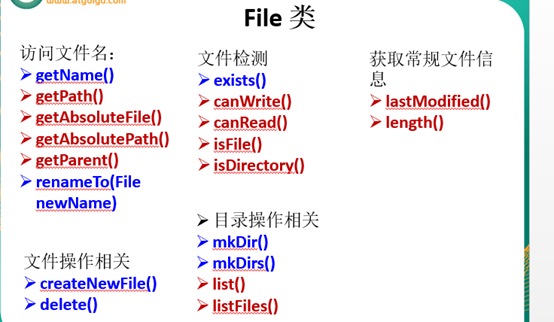
eg:
|
File dir1 = new File("D:/IOTest/dir1"); if (!dir1.exists()) { // 如果D:/IOTest/dir1不存在,就创建为目录 dir1.mkdir(); } // 创建以dir1为父目录,名为"dir2"的File对象 File dir2 = new File(dir1, "dir2"); if (!dir2.exists()) { // 如果还不存在,就创建为目录 dir2.mkdirs(); } File dir4 = new File(dir1, "dir3/dir4"); if (!dir4.exists()) { dir4.mkdirs(); } // 创建以dir2为父目录,名为"test.txt"的File对象 File file = new File(dir2, "test.txt"); if (!file.exists()) { // 如果还不存在,就创建为文件 file.createNewFile();} |
Java IO原理
-
IO流用来处理设备之间的数据传输。
-
Java程序中,对于数据的输入/输出操作以"流(stream)" 的方式进行。
-
java.io包下提供了各种"流"类和接口,用以获取不同种类的数据,并通过标准的方法输入或输出数据。

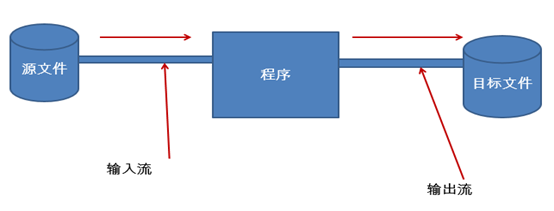
流的分类
-
按操作数据单位不同分为:字节流(8 bit),字符流(16 bit)
-
按数据流的流向不同分为:输入流,输出流
-
按流的角色的不同分为:节点流,处理流
|
(抽象基类) |
字节流 |
字符流 |
|
输入流 |
InputStream |
Reader |
|
输出流 |
OutputStream |
Writer |
-
Java的IO流共涉及40多个类,实际上非常规则,都是从如上4个抽象基类派生的。
-
由这四个类派生出来的子类名称都是以其父类名作为子类名后缀。
-
字节流:以byte为单位传输
-
字符流:以char为单位传输
IO流体系
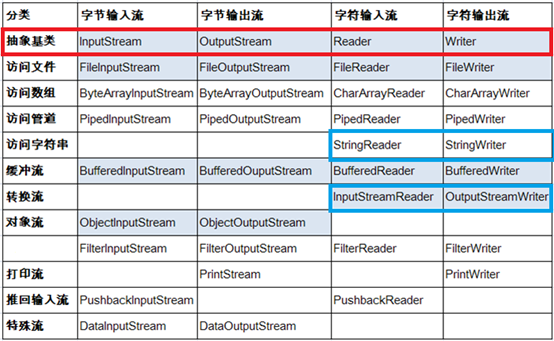
InputStream & Reader
-
InputStream 和 Reader 是所有输入流的基类。
-
InputStream(典型实现:FileInputStream)
-
int read()
-
int read(byte[] b)
-
int read(byte[] b, int off, int len)
-
-
Reader(典型实现:FileReader)
-
int read()
-
int read(char [] c)
-
int read(char [] c, int off, int len)
-
-
程序中打开的文件 IO 资源不属于内存里的资源,垃圾回收机制无法回收该资源,所以应该显式关闭文件 IO 资源。
OutputStream & Writer
-
OutputStream 和 Writer 也非常相似:
-
void write(int b/int c);
-
void write(byte[] b/char[] cbuf);
-
void write(byte[] b/char[] buff, int off, int len);
-
void flush();
-
void close(); 需要先刷新,再关闭此流
-
-
因为字符流直接以字符作为操作单位,所以 Writer 可以用字符串来替换字符数组,即以 String 对象作为参数
-
void write(String str);
-
void write(String str, int off, int len);
-
文件流
读取文件
1.建立一个流对象,将已存在的一个文件加载进流。
-
FileReader fr = new FileReader("Test.txt");
2.创建一个临时存放数据的数组。
-
char[] ch = new char[1024];
3.调用流对象的读取方法将流中的数据读入到数组中。
-
fr.read(ch);
|
FileReader fr = null; try{ fr = new FileReader("c:\\test.txt"); char[] buf = new char[1024]; int len= 0; while((len=fr.read(buf))!=-1){ System.out.println(new String(buf ,0,len));} }catch (IOException e){ System.out.println("read-Exception :"+e.toString());} finally{ if(fr!=null){ try{ fr.close(); }catch (IOException e){ System.out.println("close-Exception :"+e.toString()); } } } |
写入文件
1.创建流对象,建立数据存放文件
-
FileWriter fw = new FileWriter("Test.txt");
2.调用流对象的写入方法,将数据写入流
-
fw.write("text");
3.关闭流资源,并将流中的数据清空到文件中。
-
fw.close();
|
FileWriter fw = null; try{ fw = new FileWriter("Test.txt"); fw.write("text"); } catch (IOException e){ System.out.println(e.toString()); } finally{ If(fw!=null) try{ fw.close(); } catch (IOException e){ System.out.println(e.toString()); } } |
注意点:
-
定义文件路径时,注意:可以用"/"或者"\\"。File.separator()
-
在写入一个文件时,如果目录下有同名文件将被覆盖。
-
在读取文件时,必须保证该文件已存在,否则出异常。
处理流之一:缓冲流
-
为了提高数据读写的速度,Java API提供了带缓冲功能的流类,在使用这些流类时,会创建一个内部缓冲区数组
-
根据数据操作单位可以把缓冲流分为:
-
BufferedInputStream 和 BufferedOutputStream
-
BufferedReader 和 BufferedWriter
-
缓冲流要"套接"在相应的节点流之上,对读写的数据提供了缓冲的功能,提高了读写的效率,同时增加了一些新的方法
-
对于输出的缓冲流,写出的数据会先在内存中缓存,使用flush()将会使内存中的数据立刻写出
|
BufferedReader br = null; BufferedWriter bw = null; try { //step1:创建缓冲流对象:它是过滤流,是对节点流的包装 br = new BufferedReader(new FileReader("d:\\IOTest\\source.txt")); bw = new BufferedWriter(new FileWriter("d:\\IOTest\\destBF.txt")); String str = null; while ((str = br.readLine()) != null) { //一次读取字符文本文件的一行字符 bw.write(str); //一次写入一行字符串 bw.newLine(); //写入行分隔符 } bw.flush(); //step2:刷新缓冲区 } catch (IOException e) { e.printStackTrace(); } finally { // step3: 关闭IO流对象 try { if (bw != null) { bw.close(); //关闭过滤流时,会自动关闭它所包装的底层节点流 } } catch (IOException e) { e.printStackTrace(); } try { if (br != null) { br.close(); } } catch (IOException e) { e.printStackTrace(); } } |
处理流之二:转换流
-
转换流提供了在字节流和字符流之间的转换
-
Java API提供了两个转换流:
-
InputStreamReader和OutputStreamWriter
-
-
字节流中的数据都是字符时,转成字符流操作更高效。
InputStreamReader
-
用于将字节流中读取到的字节按指定字符集解码成字符。需要和InputStream"套接"。
-
构造方法
-
public InputStreamReader(InputStream in)
-
public InputSreamReader(InputStream in,String charsetName)
如: Reader isr = new
InputStreamReader(System.in,"ISO5334_1");//指定字符集
OutputStreamWriter
-
用于将要写入到字节流中的字符按指定字符集编码成字节。需要和OutputStream"套接"。
-
构造方法
-
public OutputStreamWriter(OutputStream out)
-
public OutputStreamWriter(OutputStream out,String charsetName)

|
public void testMyInput() throws Exception{ FileInputStream fis = new FileInputStream("dbcp.txt"); FileOutputStream fos = new FileOutputStream("dbcp5.txt"); InputStreamReader isr = new InputStreamReader(fis,"GBK"); OutputStreamWriter osw = new OutputStreamWriter(fos,"GBK"); BufferedReader br = new BufferedReader(isr); BufferedWriter bw = new BufferedWriter(osw); String str = null; while((str = br.readLine()) != null){ bw.write(str); bw.newLine(); bw.flush(); } bw.close(); br.close();} |
补充:字符编码
-
编码表的由来
计算机只能识别二进制数据,早期由来是电信号。为了方便应用计算机,让它可以识别各个国家的文字。就将各个国家的文字用数字来表示,并一一对应,形成一张表。这就是编码表。
-
常见的编码表
-
ASCII:美国标准信息交换码。
-
用一个字节的7位可以表示。
-
-
ISO8859-1:拉丁码表。欧洲码表
-
用一个字节的8位表示。
-
-
GB2312:中国的中文编码表。
-
GBK:中国的中文编码表升级,融合了更多的中文文字符号。
-
Unicode:国际标准码,融合了多种文字。
-
所有文字都用两个字节来表示,Java语言使用的就是unicode
-
-
UTF-8:最多用三个字节来表示一个字符。
-
编码:字符串à字节数组
-
解码:字节数组à字符串
-
转换流的编码应用
-
可以将字符按指定编码格式存储。
-
可以对文本数据按指定编码格式来解读。
-
指定编码表的动作由构造器完成。
处理流之三:标准输入输出流
-
System.in和System.out分别代表了系统标准的输入和输出设备
-
默认输入设备是键盘,输出设备是显示器
-
System.in的类型是InputStream
-
System.out的类型是PrintStream,其是OutputStream的子类FilterOutputStream 的子类
-
通过System类的setIn,setOut方法对默认设备进行改变。
-
public static void setIn(InputStream in)
-
public static void setOut(PrintStream out)
-
|
System.out.println("请输入信息(退出输入e或exit):"); //把"标准"输入流(键盘输入)这个字节流包装成字符流,再包装成缓冲流 BufferedReader br = new BufferedReader( new InputStreamReader(System.in)); String s = null; try { while ((s = br.readLine()) != null) { //读取用户输入的一行数据 --> 阻塞程序 if (s.equalsIgnoreCase("e") || s.equalsIgnoreCase("exit")) { System.out.println("安全退出!!"); break; } //将读取到的整行字符串转成大写输出 System.out.println("-->:"+s.toUpperCase()); System.out.println("继续输入信息"); } } catch (IOException e) { e.printStackTrace(); } finally { try { if (br != null) { br.close(); //关闭过滤流时,会自动关闭它包装的底层节点流 } } catch (IOException e) { e.printStackTrace(); } }
|
处理流之四:打印流(了解)
-
在整个IO包中,打印流是输出信息最方便的类。
-
PrintStream(字节打印流)和PrintWriter(字符打印流)
-
提供了一系列重载的print和println方法,用于多种数据类型的输出
-
PrintStream和PrintWriter的输出不会抛出异常
-
PrintStream和PrintWriter有自动flush功能
-
System.out返回的是PrintStream的实例
-
|
FileOutputStream fos = null; try { fos = new FileOutputStream(new File("D:\\IO\\text.txt")); } catch (FileNotFoundException e) { e.printStackTrace(); }//创建打印输出流,设置为自动刷新模式(写入换行符或字节 '\n' 时都会刷新输出缓冲区) PrintStream ps = new PrintStream(fos,true); if (ps != null) { // 把标准输出流(控制台输出)改成文件 System.setOut(ps);} for (int i = 0; i <= 255; i++) { //输出ASCII字符 System.out.print((char)i); if (i % 50 == 0) { //每50个数据一行 System.out.println(); // 换行 } } ps.close(); } |
处理流之五:数据流(了解)
-
为了方便地操作Java语言的基本数据类型的数据,可以使用数据流。
-
数据流有两个类:(用于读取和写出基本数据类型的数据)
-
DataInputStream 和 DataOutputStream
-
分别"套接"在 InputStream 和 OutputStream 节点流上
-
-
DataInputStream中的方法
boolean readBoolean() byte readByte()
char readChar() float readFloat()
double readDouble() short readShort()
long readLong() int readInt()
String readUTF() void readFully(byte[] b)
-
DataOutputStream中的方法
-
将上述的方法的read改为相应的write即可。
|
DataOutputStream dos = null; try { //创建连接到指定文件的数据输出流对象 dos = new DataOutputStream(new FileOutputStream( "d:\\IOTest\\destData.dat")); dos.writeUTF("ab中国"); //写UTF字符串 dos.writeBoolean(false); //写入布尔值 dos.writeLong(1234567890L); //写入长整数 System.out.println("写文件成功!"); } catch (IOException e) { e.printStackTrace(); } finally { //关闭流对象 try { if (dos != null) { // 关闭过滤流时,会自动关闭它包装的底层节点流 dos.close(); } } catch (IOException e) { e.printStackTrace(); } } |
处理流之六:对象流
-
ObjectInputStream和OjbectOutputSteam
-
用于存储和读取对象的处理流。它的强大之处就是可以把Java中的对象写入到数据源中,也能把对象从数据源中还原回来。
-
序列化(Serialize):用ObjectOutputStream类将一个Java对象写入IO流中
-
反序列化(Deserialize):用ObjectInputStream类从IO流中恢复该Java对象
-
ObjectOutputStream和ObjectInputStream不能序列化static和transient修饰的成员变量
对象的序列化
-
对象序列化机制允许把内存中的Java对象转换成平台无关的二进制流,从而允许把这种二进制流持久地保存在磁盘上,或通过网络将这种二进制流传输到另一个网络节点。当其它程序获取了这种二进制流,就可以恢复成原来的Java对象
-
序列化的好处在于可将任何实现了Serializable接口的对象转化为字节数据,使其在保存和传输时可被还原
-
序列化是 RMI(Remote Method Invoke – 远程方法调用)过程的参数和返回值都必须实现的机制,而 RMI 是 JavaEE 的基础。因此序列化机制是 JavaEE 平台的基础
-
如果需要让某个对象支持序列化机制,则必须让其类是可序列化的,为了让某个类是可序列化的,该类必须实现如下两个接口之一:
-
Serializable
-
Externalizable
-
-
凡是实现Serializable接口的类都有一个表示序列化版本标识符的静态变量:
-
private static final long serialVersionUID;
-
serialVersionUID用来表明类的不同版本间的兼容性
-
如果类没有显示定义这个静态变量,它的值是Java运行时环境根据类的内部细节自动生成的。若类的源代码作了修改,serialVersionUID 可能发生变化。故建议,显示声明
-
-
显示定义serialVersionUID的用途
-
希望类的不同版本对序列化兼容,因此需确保类的不同版本具有相同的serialVersionUID
-
不希望类的不同版本对序列化兼容,因此需确保类的不同版本具有不同的serialVersionUID
-
使用对象流序列化对象
-
若某个类实现了 Serializable 接口,该类的对象就是可序列化的:
-
创建一个 ObjectOutputStream
-
调用 ObjectOutputStream 对象的 writeObject(对象) 方法输出可序列化对象。注意写出一次,操作flush()
-
-
反序列化
-
创建一个 ObjectInputStream
-
调用 readObject() 方法读取流中的对象
-
-
强调:如果某个类的字段不是基本数据类型或 String 类型,而是另一个引用类型,那么这个引用类型必须是可序列化的,否则拥有该类型的 Field 的类也不能序列化
序列化:将对象写入到磁盘或者进行网络传输。
要求对象必须实现序列化
ObjectOutputStream oos = new ObjectOutputStream(new FileOutputStream("test3.txt"));
Person p = new Person("韩梅梅",18,"中华大街",new Pet());
oos.writeObject(p);
oos.flush();
oos.close();
//反序列化:将磁盘中的对象数据源读出。
ObjectInputStream ois = new ObjectInputStream(new FileInputStream("test3.txt"));
Person p1 = (Person)ois.readObject();
System.out.println(p1.toString());
ois.close();
RandomAccessFile 类
-
RandomAccessFile 类支持 "随机访问" 的方式,程序可以直接跳到文件的任意地方来读、写文件
-
支持只访问文件的部分内容
-
可以向已存在的文件后追加内容
-
-
RandomAccessFile 对象包含一个记录指针,用以标示当前读写处的位置。RandomAccessFile 类对象可以自由移动记录指针:
-
long getFilePointer():获取文件记录指针的当前位置
-
void seek(long pos):将文件记录指针定位到 pos 位置
-
-
构造器
-
创建 RandomAccessFile 类实例需要指定一个 mode 参数,该参数指定 RandomAccessFile 的访问模式:
-
r: 以只读方式打开
-
rw:打开以便读取和写入
-
rwd:打开以便读取和写入;同步文件内容的更新
-
rws:打开以便读取和写入;同步文件内容和元数据的更新
-
读取文件内容
|
RandomAccessFile raf = new RandomAccessFile("test.txt", "rw"); raf.seek(5); byte [] b = new byte[1024]; int off = 0; int len = 5; raf.read(b, off, len);
String str = new String(b, 0, len); System.out.println(str);
raf.close(); |
写入文件内容
|
RandomAccessFile raf = new RandomAccessFile("test.txt", "rw"); raf.seek(5);
//先读出来 String temp = raf.readLine();
raf.seek(5); raf.write("xyz".getBytes()); raf.write(temp.getBytes());
raf.close(); |
流的基本应用小节
-
流是用来处理数据的。
-
处理数据时,一定要先明确数据源,与数据目的地
-
数据源可以是文件,可以是键盘。
-
数据目的地可以是文件、显示器或者其他设备。
-
-
而流只是在帮助数据进行传输,并对传输的数据进行处理,比如过滤处理、转换处理等。
-
字节流-缓冲流(重点)
-
输入流InputStream-FileInputStream-BufferedInputStream
-
输出流OutputStream-FileOutputStream-BufferedOutputStream
-
字符流-缓冲流(重点)
-
输入流Reader-FileReader-BufferedReader
-
输出流Writer-FileWriter-BufferedWriter
-
转换流
-
InputSteamReader和OutputStreamWriter
-
对象流ObjectInputStream和ObjectOutputStream(难点)
-
序列化
-
反序列化
-
随机存取流RandomAccessFile(掌握读取、写入)
<< 上一篇
下一篇 >>
网友留言(8条)